# How to create content drawers on Wicket
> In one of our projects, we needed to let the user navigate into a tree of hierarchical entities.
**Date:** 2014-08-06
**Author:** André Camilo
**Tags:** Bootstrap, Wicket, Java
In one of our projects, we needed to let the user navigate into a tree of hierarchical entities. The Product Owner wanted to display this additional content without leaving the context of the root page. So, the designers decided to adopt the concept of visual drawers, as used by [Spotify](https://play.spotify.com/), wherein, as one navigates down the tree, the various panels stack up on each other.

The project's tech stack is based on [Wicket](http://wicket.apache.org/) and [Bootstrap](http://getbootstrap.com/). This article presents a detailed overview of how we implemented this concept using these frameworks.
## Front End Development
Building stacked modal panels in Bootstrap is made trivial by the adoption of the [Bootstrap Modal](https://github.com/jschr/bootstrap-modal/) library. All that's left, from a front end standpoint, is to apply drawer-like styling and effects to those modals.
We won't be showing the CSS code here, but the HTML element for each drawer just looks like this:
```html
```
Here is the javascript code to display the drawer:
```javascript
$('#drawer1').modaldrawer('show');
```
This is all very similar to the way we display modals in Bootstrap. The differences appear when we want to display a second drawer, wherein we must set the first one aside. The javascript code to show a second drawer is as follows:
```javascript
$('#drawer2').modaldrawer('show');
$('#drawer1').addClass('hidden-drawer');
```
This is a fairly simple solution, although there are a few subtleties I'll discuss later on.
## Wicket...
To implement drawers in Wicket, we gave each page a component called `DrawerManager`, that basically controls the drawers currently visible on the page. The idea is for this component to manage the drawers in a stack, wherein the top drawer is the one currently on display. To work with the `DrawerManager`, each drawer must inherit from a base class called `AbstractDrawer`.
The API we came up with looks like this:
```java
public void push(AbstractDrawer drawer, AjaxRequestTarget target);
public void pop(AbstractDrawer drawer, AjaxRequestTarget target);
```
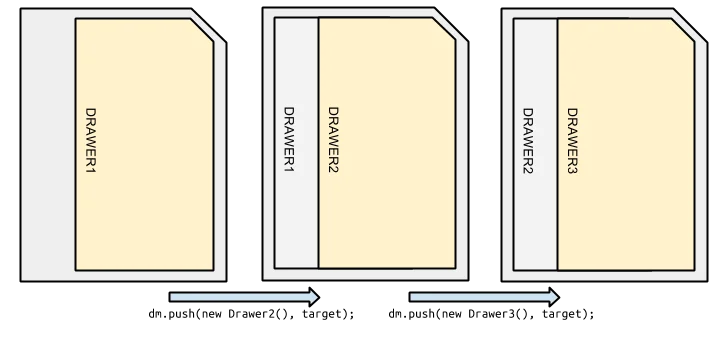
The push method opens the drawer passed in as a parameter, and hides the one currently open, if any; the pop method removes all the drawers from the top of the stack down to and including the drawer passed in as a parameter. All of this is done via AJAX.
Actually, that was the first problem we encountered. How can we build a stack of panels that can be updated via AJAX?
### Repeater/ListView
The most obvious solution, and the one typically used in the Wicket world, is to use a `Repeater/ListView` (or derivate thereof). Using a `Repeater`, the stack of `AbstractDrawer`'s would be passed as a model, and a `WebMarkupContainer` (container) would be created, with the `Repeater` inside. The markup would look something like this:
```html
```
The reason for the container is that Wicket can't update a `ListView` via AJAX, which is why this is a problem to begin with. When Wicket updates the container, it will trigger the rendering of everything inside that container. In other words, every time we want to open a new drawer, Wicket will have to render all the drawers already open, as well as the new one; this can be almost as heavy as rendering the whole page anew.
### The other way
The solution we adopted instead was to use a linked list data structure. We have an HTML element (in this case, a div) called `ListItem`, that has 2 members, `Content` and `Next`. `Content` holds the drawer itself, and `Next` has the next `ListItem` in the stack, or an `EmptyPanel` if there is no next item.
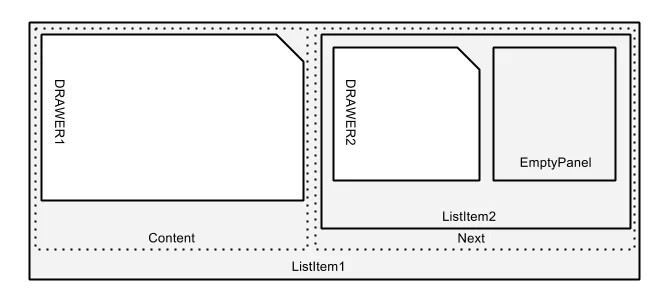
This way, it's possible to add or remove items from the stack via AJAX, without having to update all the drawers, rendering only the top of the stack.
To implement this, our `DrawerManager` has to keep the stack of `ListItem`'s and a reference to the first `ListItem`:
```java
public class DrawerManager extends Panel {
private Deque drawers = new ArrayDeque<>();
private ListItem first;
public DrawerManager(String id){
super(id);
add(new EmptyPanel("next"));
}
...
}
```
`ListItem` looks like this:
```java
public class ListItem extends Panel {
private WebMarkupContainer content;
private AbstractDrawer drawer;
private ListItem next;
private ListItem previous;
private DrawerManager manager;
public ListItem(String id, ...){
super(id);
content = new WebMarkupContainer("content");
add(content);
content.add(drawer);
add(new EmptyPanel("next"));
...
}
public void add(ListItem item){
next = item;
addOrReplace(item);
item.previous = this;
}
...
}
```
When we want to show a drawer, we call `dm.push(new Drawer1(), target)`. This method is implemented like this:
- `ListItem` is created with `Content=drawer` (by default, when a `ListItem` is created, it comes with an `EmptyPanel` in `Next`), and we add this new `ListItem` to the stack.
```java
ListItem item = new ListItem("next", drawer, this);
drawers.push(item);
```
- if there is no previous `ListItem` (i.e., First is null because we're showing the first drawer), we'll replace `DrawerManager`'s `Next` component with the new `ListItem`.
```java
if(first==null){
first = item;
addOrReplace(first);
}
```
- if there are drawers on the page already, we have to add the new `ListItem` at the `Next` of the `ListItem` on top of the stack.
```java
else {
ListItem iter = first;
while(iter.next!=null) iter = iter.next;
iter.add(item);
}
```
- then, we update the `DrawerManager`'s contents via AJAX, causing only the new `ListItem` to be rendered.
```java
target.add(item);
```
When we want to close a drawer (and all the ones above it on the stack), we call `dm.eventPop(drawer1, target)`:
- we'll pop from the stack of `ListItem`'s, until we find the `ListItem` with drawer1 in it, and for each `ListItem` we popped, we call its `internalPop` method.
```java
ListItem item = drawers.pop();
while(item.drawer!=drawer){
internalPop(item, target);
item = drawers.pop();
}
internalPop(item.target);
```
- the `internalPop` method will update the references in the other drawers and replace their `Next` `ListItems` with an `EmptyPanel`.
```java
MarkupContainer previous = null;
if(item.previous==null){
first = null;
previous = this;
} else {
item.previous.next = null;
previous = item.previous;
}
Panel panel = new EmptyPanel("next");
previous.addOrReplace(panel);
target.add(panel);
```
This way, we get a stack of drawers wherein we only render the one(s) we add or remove.
It should be noted that the removal of drawers is triggered via javascript, as the `hide-modal` event calls the `eventPop` method. I'll discuss later how we handle that event.
# Adding drawer effects with CSS+Javascript
Now that we've gotten Wicket to generate the required HTML to update drawers via AJAX, we need to get it to generate the required javascript to present the drawers with all the pretties.
To add effects when a drawer is added via AJAX, we need to add the following to the push method:
```java
target.appendJavaScript("$('#"+item.item.getMarkupId()+"')
.modaldrawer('show');");
if(item.previous!=null){
target.appendJavaScript("$('#"+item.previous.item
.getMarkupId()+"')
.removeClass('shown-modal');");
target.appendJavaScript("$('#"+item.previous.item
.getMarkupId()+"')
.addClass('hidden-modal');");
}
```
This causes the added panel to be "transformed" into a drawer, and causes the previous one to become hidden.
We also need to ensure that, when the page is refreshed, the drawer divs are transformed into modals, as we have done in the push method. For that, when the `DrawerManager` is rendered, we have to walk the stack from the base to the top and apply the correct javascript. If the `ListItem` is on top of the stack, it must remain visible. Otherwise, it must be made a hidden drawer.
```java
@Override
public void renderHead(IHeaderResponse response){
super.renderHead(response);
Iterator iter = drawers.descendingIterator();
WebMarkupContainer drawer;
while(iter.hasNext()){
drawer = iter.next().item;
StringBuilder sb = new StringBuilder();
String element = "$('#"+drawer.getMarkupId()+"')";
sb.append(element+".modaldrawer('show');");
if(drawers.getFirst().item.equals(drawer)){
sb.append(element+".addClass('shown-modal');");
sb.append(element+".removeClass('hidden-modal');");
} else {
sb.append(element+".removeClass('shown-modal');");
sb.append(element+".addClass('hidden-modal');");
}
target.appendJavaScript(sb.toString());
}
}
```
And finally the part about closing the drawers. When a modal is closed, the library fires the `hide-modal` event. From that event, an AJAX request must be made to remove the drawer. To do that, when a new `ListItem` is created, an event listener is added that catches the `hide-modal` event for the drawer in that `ListItem`.
Thus, in the `ListItem`'s constructor, we have this code:
```java
content.add(new AjaxEventBehaviour("hide-modal"){
@Override
protected void onEvent(AjaxRequestTarget target){
manager.eventPop(ListItem.this.drawer, target);
String element = "$('#"+item.getMarkupId()+"')";
StringBuilder sb = new StringBuilder();
sb.append(element+".unbind('hide-modal');");
sb.append(element+".modaldrawer('hide');");
target.appendJavaScript(sb.toString());
}
}
```
This way, when the user attempts to close the drawer, the `eventPop` method will be called, and the drawer will be closed.
When that happens, we need to re-open the previous drawer, if there was one. For that, we alter the previously defined `internalPop`, to add the class `shown-modal` and remove the class `hidden-modal`:
```java
String element = "$('#"+item.previous.item.getMarkupId()+"')";
StringBuilder sb = new StringBuilder();
sb.append(element+".addClass('shown-modal');");
sb.append(element+".removeClass('hidden-modal');");
target.appendJavaScript(sb.toString());
```
## That's all folks
After all of this, we are left with a drawer system, such as the one seen here: [https://wicket-drawer.premium-minds.com/](https://wicket-drawer.premium-minds.com/)
Source code: [https://github.com/ajcamilo/wicket-drawer-example](https://github.com/ajcamilo/wicket-drawer-example)