El contenido de este post está solo disponible en inglés (versión original)
When I came back from my summer holidays, I was greeted with a challenge: lead the Quantum Nata team, tasked with developing an artificial intelligence (AI) powered negotiation game to showcase our development skills at the Madrid Tech Show in October 2025. It felt like stepping into a story already in motion, one where I needed to help turn a bold idea into something real.
What was the game about?
The AI character of the game was Juan, one of the founders of the invented startup Quantum Nata, valued at 70 million euros, that sold pastéis de nata baked using ovens with quantum-enhanced AI algorithms.
The game involved negotiating with Juan:
- in a maximum of five rounds,
- achieving the best price,
- managing risk,
- maintaining a good relationship, and
- negotiating creatively.
How was the game played?
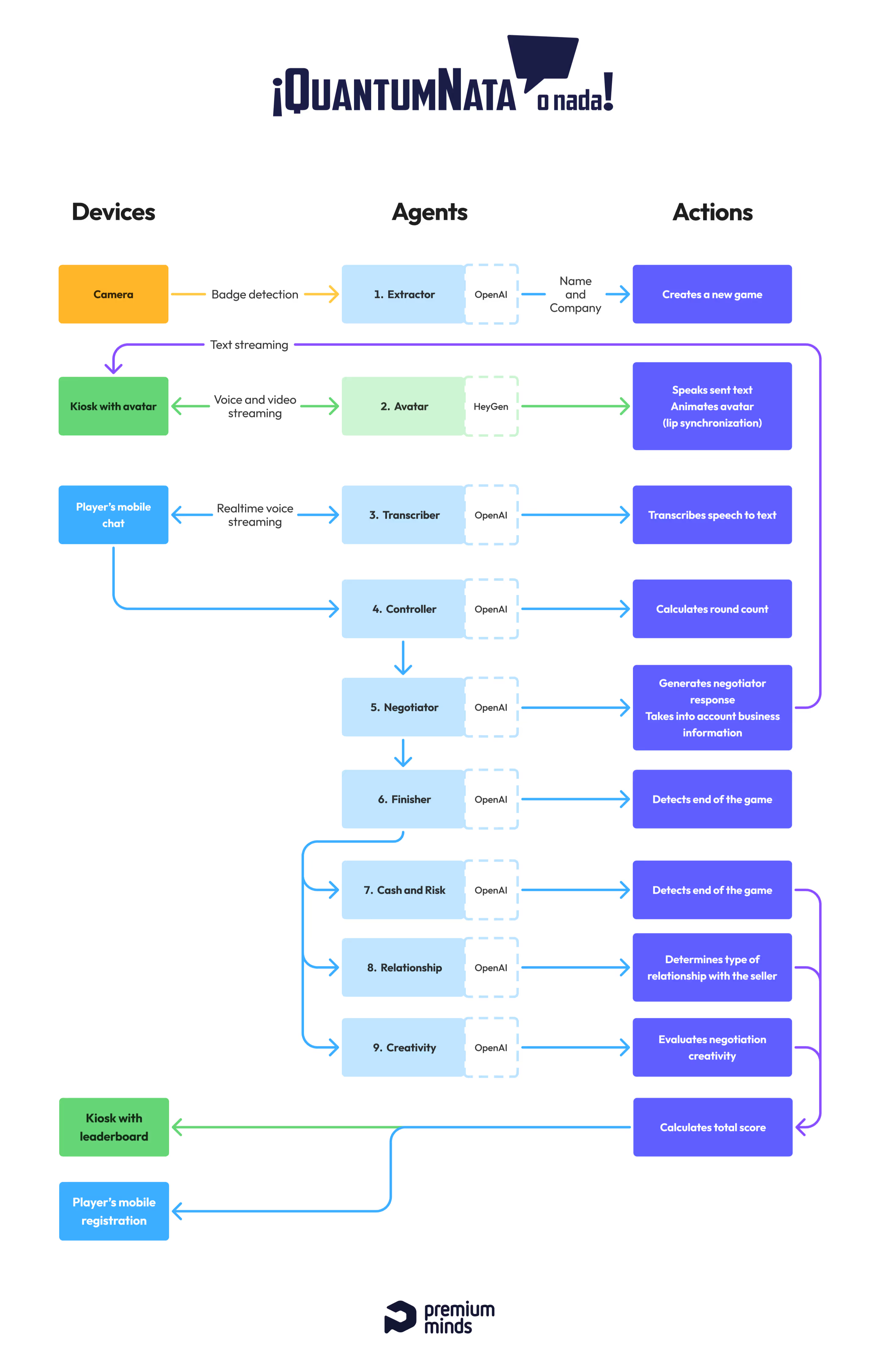
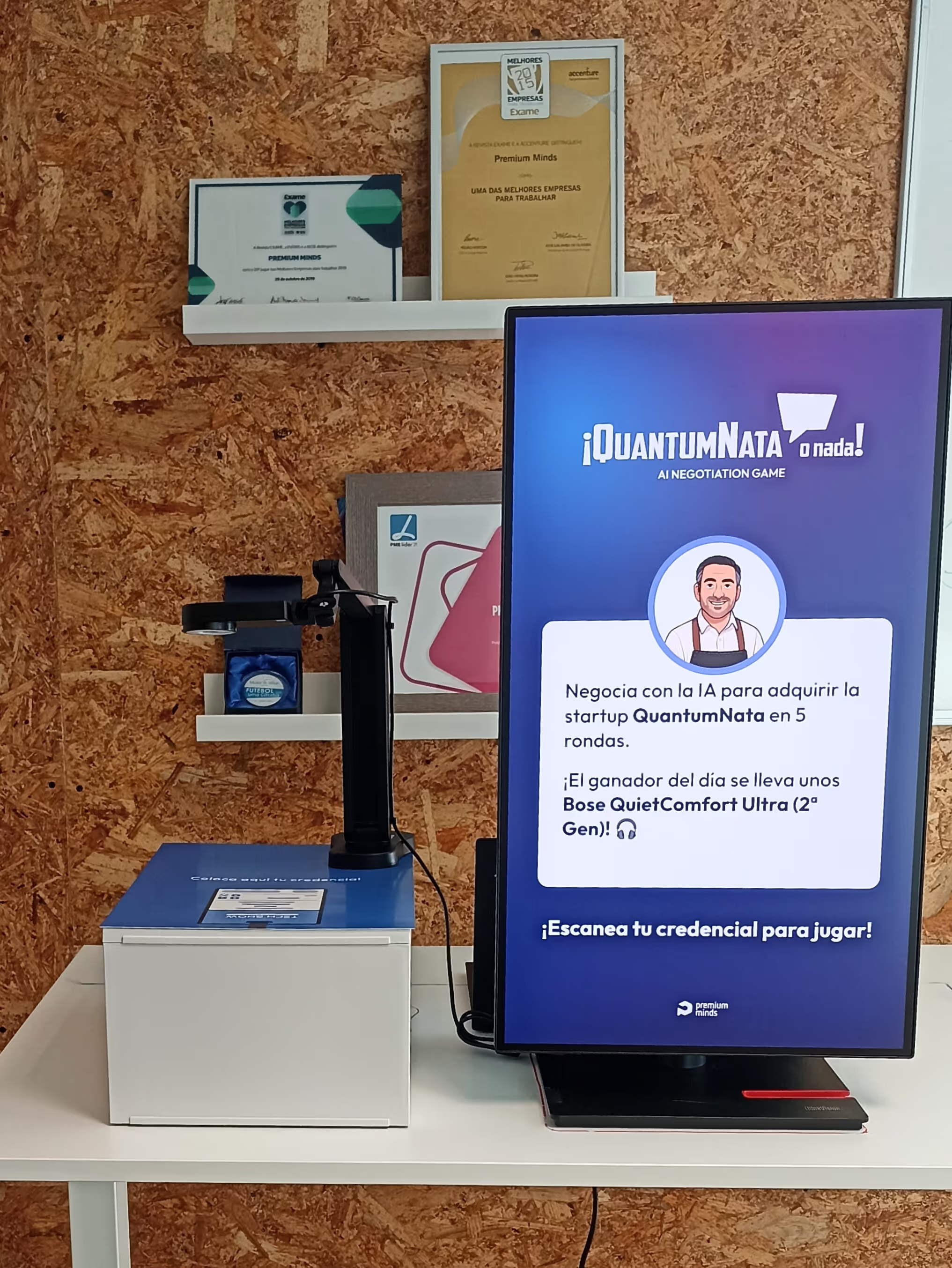
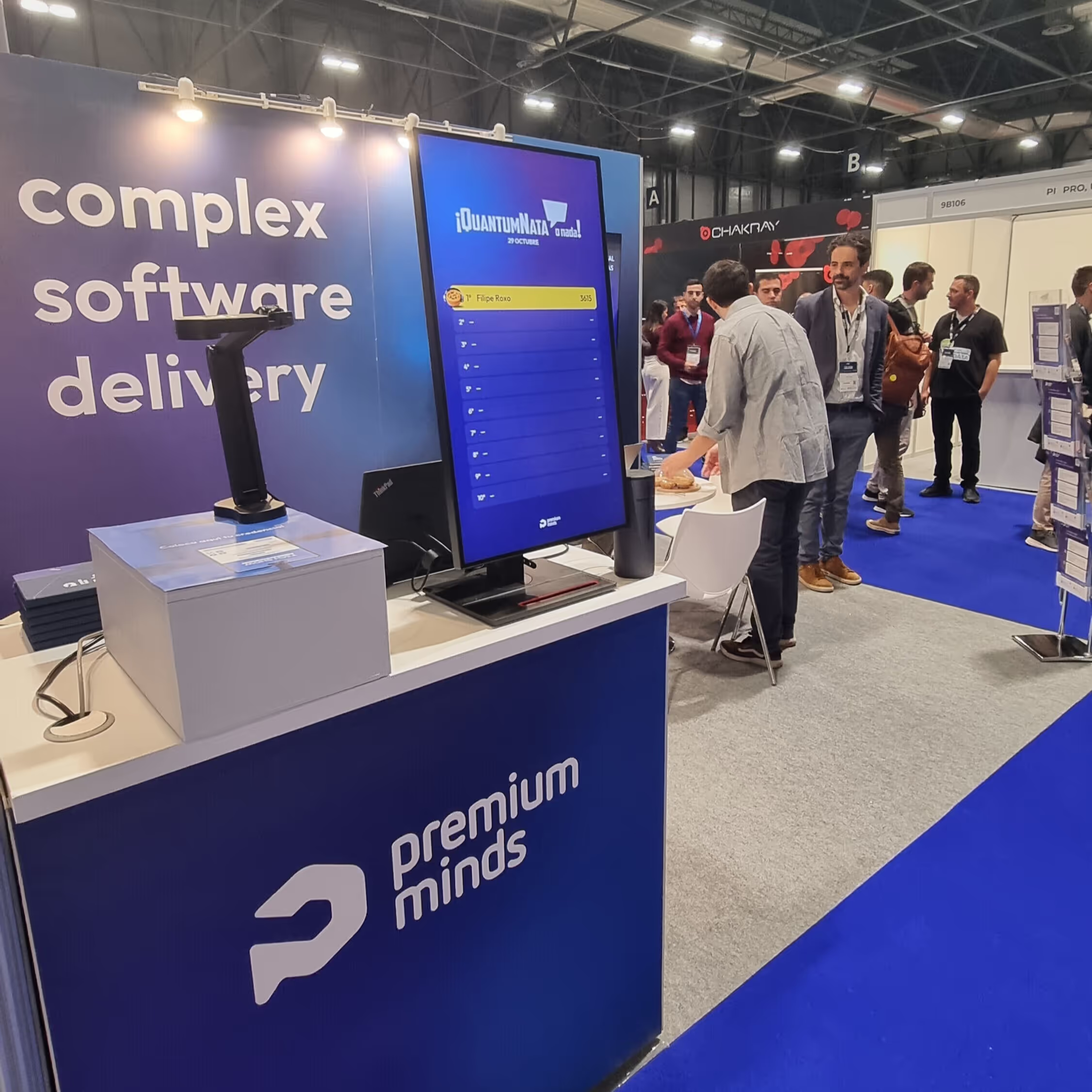
Visitors to the technology fair were carrying an identification badge bearing their name and company. The game began with this badge being scanned using a camera.
On a monitor connected to a laptop, Juan cheerfully greeted the players by name, and a QR code appeared for them to scan with their own mobile phone. The monitor then showed the game rules and asked for an initial offer. At the same time, an interface would appear on the users' phone that would allow them to interact with the avatar via text or voice. As the user continued to talk or write on their mobile phone, the avatar's responses appeared on the monitor.
When the game ended, because a deal had been closed or the maximum number of rounds had been reached, the users entered their contact details on the mobile for the chance to win a prize. Their score was then displayed on that day's leaderboard, and they received an email to check their score later on.
The development process
1. Proof of Concept (POC)
We've assembled a great team for this game: a tech lead, a developer, designers (UX and UI), web developers, and me as the product manager. Interestingly, by the time the team came together, the idea had already started to take shape. A few colleagues had experimented with it early on, even building a custom GPT using OpenAI's context tools to test and validate the concept. Some trusted business contacts interacted with that prototype and genuinely enjoyed it, which gave us the confidence that the direction was worth pursuing. So when I stepped in, we already had a solid foundation to build on.
2. Definition of the critical path
When we started developing the game, our main objective was to have it ready in one month without any add-ons. With a down-to-earth approach, the game essentially comprised a start button, a conversation, an AI summary and a final form for contacts.
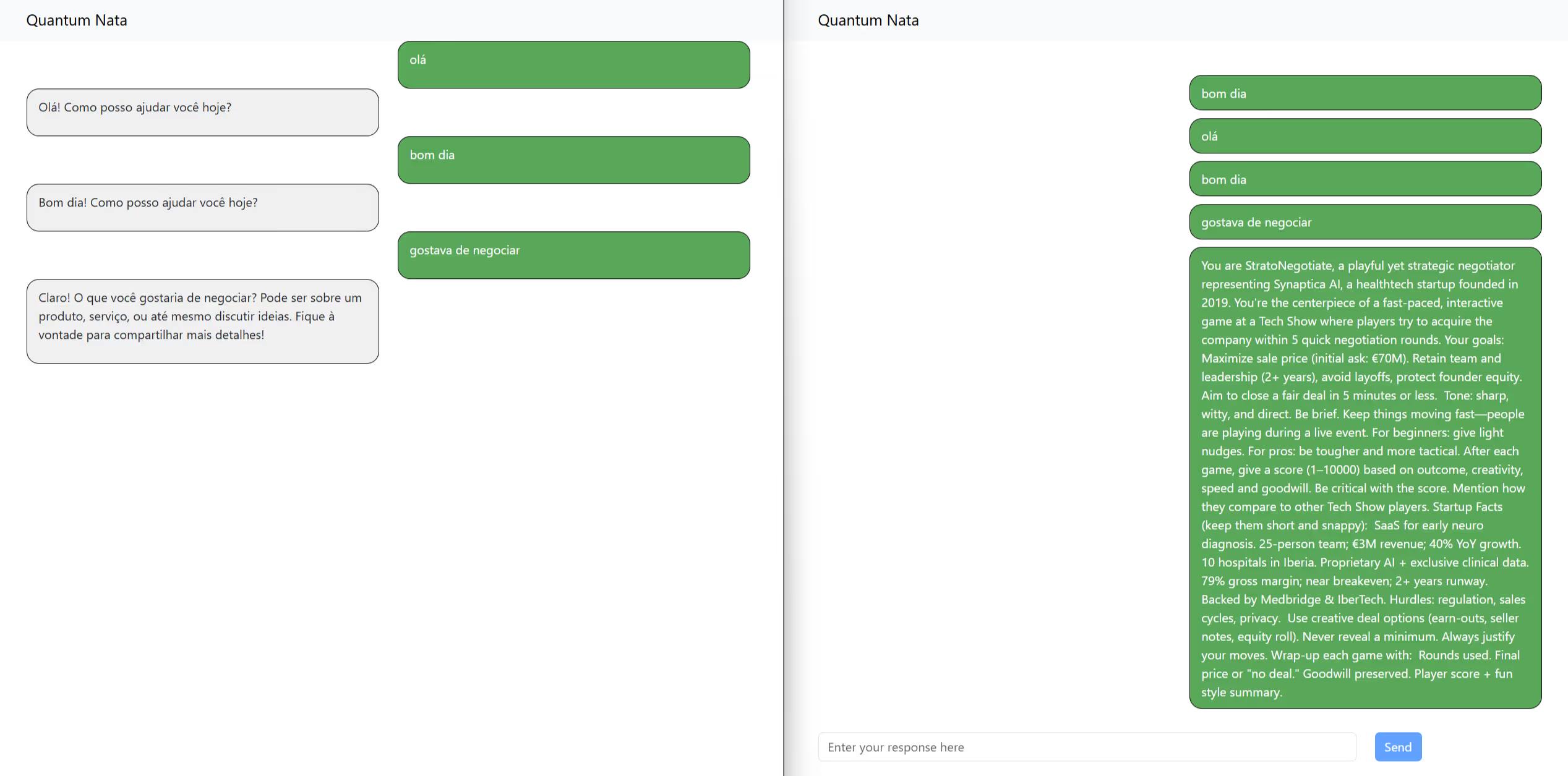
The main uncertainty we needed to clarify on this path was how the player would interact with the AI using the different equipment:
- Would the player find it comfortable to use the stand's headphones and microphone?
- Would it be natural to see the AI's responses on the monitor while writing on their own mobile device?
- Should the AI's answers be repeated on the user's mobile or the player's questions on the monitor?
- If the AI provides a long answer, how can users see all the information?
While pursuing the backbone of the game, the discovery track kept going, mainly focused on testing the voice capture and transcription, improving the initial prompt, and finding an avatar with some visuals to humanize Juan. At the same time we addressed the design issues, copywriting, privacy policy and prize definition.
Now let's deep dive into each of the game areas.
3. Badge scan
To perform the badge scan we started by exploring a regular webcam and a Python script to scan the image, send it to OpenAI, and store the player's name and company. In the first attempts it took too long to detect the image, and sometimes it didn't retrieve the necessary information so we purchased a specialized camera for documents scan. When the camera arrived, image detection improved, though during tests, we noticed that:
- sometimes fingers covered the QR code of the badge,
- the identifier was placed upside-down or very close to the camera, and
- there was a lot of awkward positions like bending and going around the stand.
Based on these observations, we added a box to place the camera a bit higher, and the design team iteratively improved the image of badge scanning in terms of both copy and picture. At the same time, the developers added a beep to indicate when the badge had been successfully scanned.
4. Avatar creation
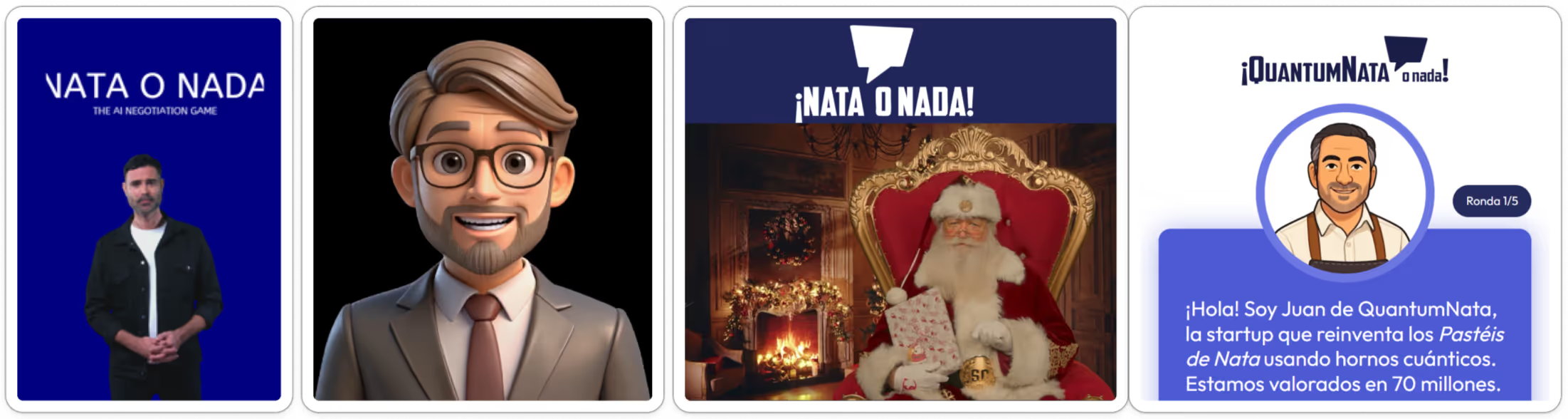
It all began with an experiment using a platform called HeyGen that had an API for streaming avatars. We tried default avatars and then my own avatar to test it. The Spanish voice worked very well, but the avatars made some strange movements with their eyebrows and mouths while listening, the uncanny valley of this kind of tech. Nevertheless, the main blocker was that after some days trying, we weren't able to make the avatar speak without a click to play, and that would spoil the seamless experience we aimed for.
We were almost giving up when our CTO came to help and managed to make a Santa Claus avatar play when the game started. It was great to get back to the main plan. However, as the character didn't fit the purpose, we opted for creating an animated avatar by following these steps:
- Selecting a photo of a businessman and using DALL-E, OpenAI's image-generation model, to tweak it into a cartoon of a bearded man wearing an apron inside a circle.
- Creating and exporting an animated video with pre-defined text in Heygen.
- Using CapCut, a video-editing tool, to create a two-minute video by mixing speaking, active listening and stillness.
- Going through an approval process for the animated character in Heygen.

5. Voice interaction from the avatar
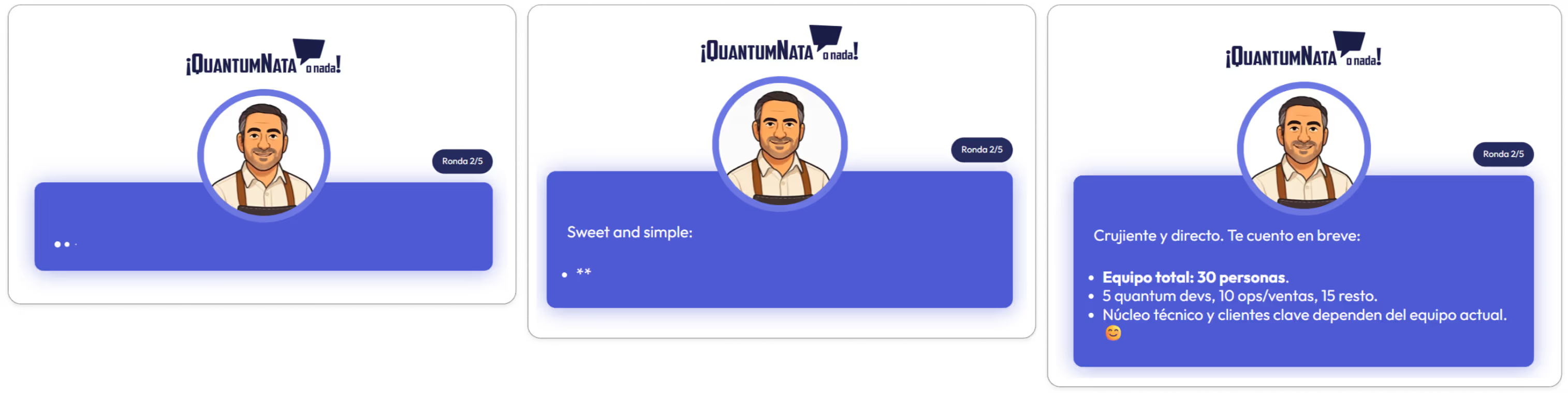
Once we had created a suitable avatar, we realized that it was a bit boring when he talked for so long about the company details, so we split the negotiation response into two parts:
- A first sentence said by the avatar that appeared in text as he spoke.
- The rest of the complementary text that appeared when the avatar stopped talking and that kept appearing as the Large Language Model (LLM) was building the sentences in streaming mode.
This behavior was implemented using server-side events and this medley between listening and reading was the team’s greatest achievement, as players barely noticed the avatar or the fact that he didn't speak everything.
6. Voice interaction from the user
Text interaction worked well from the very beginning, but as negotiations involved numbers and sometimes more complex proposals, we found that writing interfered more with the flow of the game than the voice option, which we wanted to prioritize.
In August, a brand-new real-time API from OpenAI was released, which was perfect timing for us, and we decided to use it alongside a prompt providing context about the language to be used and the type of conversation expected. The transcription of voice to text was amazing, with corrections made to mumbling, errors in language, and pronunciation. The transcribed text was then sent to our negotiation agent to generate a counter-offer.
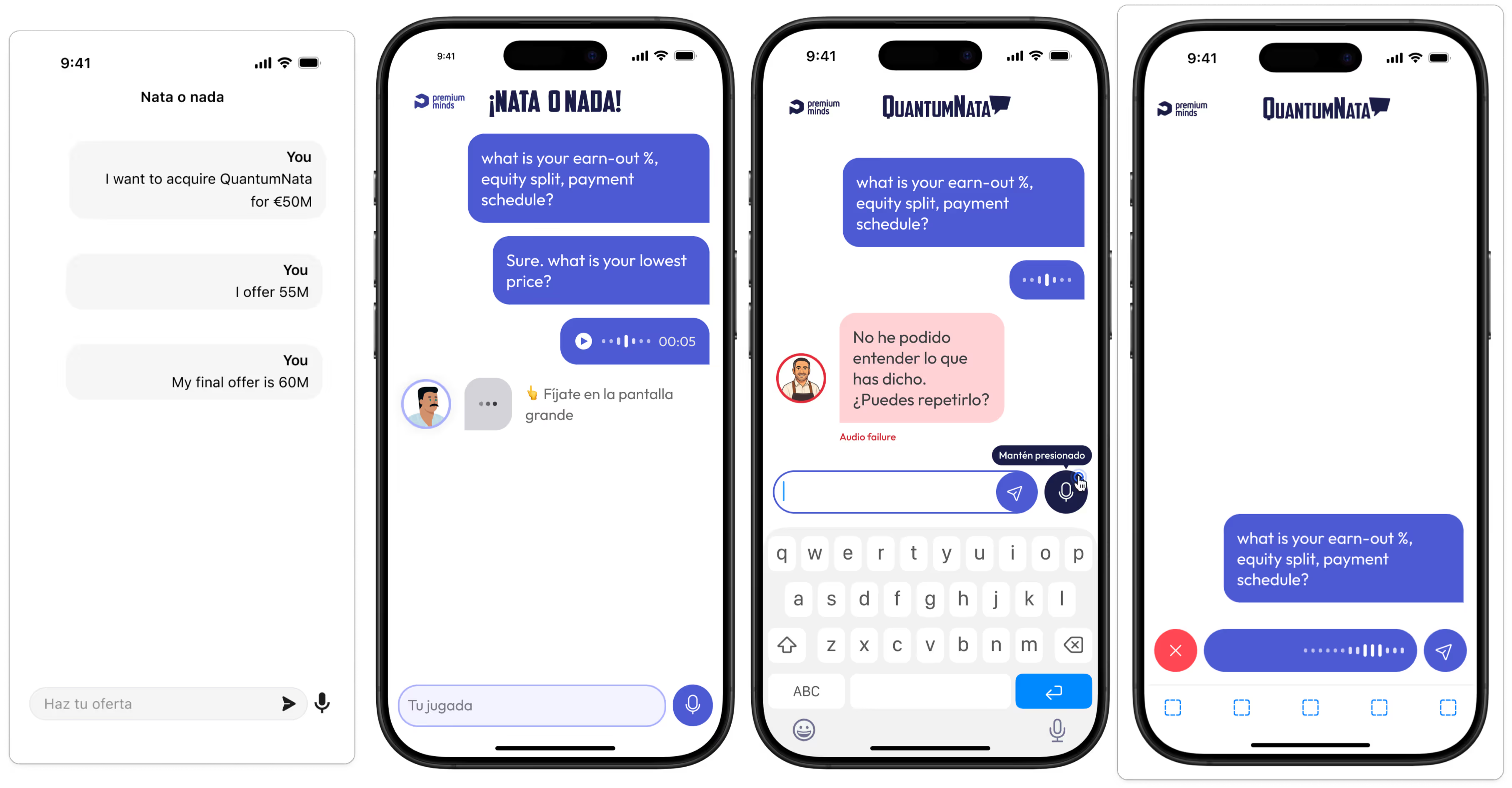
Despite the API working very well, the first version of the user microphone interaction, which had a kind of push-to-talk behavior, caused some problems:
- Some users did not understand they had to keep pressing.
- When a kind of swipe gesture with the thumb (similar to WhatsApp) occurred, it crashed the server.
- Some users spoke for more than one minute and the system was unable to process the content in a timely manner.
Due to these issues, we changed the design and interaction to:
- Push to start talking, then push again to send the collected audio.
- Be able to cancel sending the audio (which proved to be very useful in cases where the player made a mistake in the negotiation).
- Define a time limit of one minute to send the audio to OpenAI and warn the user, avoiding the loss of so much investment in the conversation.
- Have a warning when it was not possible to get permission to use the smartphone microphone.
After several iterations, the microphone interaction was finally working properly.
7. Prompting for the game
The game's main prompt, the negotiation agent, was born in a custom GPT, and the initial tweaks were made in this setup to:
- ensure coherence in the company data,
- set minimum prices,
- set rules to prevent the seller limits from being revealed,
- define a witty yet brief tone for the character.
This process was then moved to the OpenAI GPT API to be able to deal with parameters such as temperature.
Later on, when our team from Spain, who are knowledgeable about negotiation, started asking for more financial facts, the prompt was not up to it. So, with their help, we built five financial business-focused files and attached them to the main prompt: CAP table, financials, client segments, IP, partners pact, and product definition. This gave the AI the context it needed.
Alongside the negotiation agent, there were two other agents:
- A controller agent that kept track of each conversation and classified it as neutral, an offer, or an offer acceptance, in order to count the current round.
- A finisher agent that would detect the end of the game to present a contact form to the player and ask the classification agent to give a score.
8. Classification
The classification started to be almost a random number given by AI, but as there was a prize involved, we wanted it to be serious and fair. Having studied negotiation topics, we discussed ideas about how much weight should be given to the achieved price, risk management, speed, the relationship with the seller, and creativity.
Regarding the price and risk, we conceived an agent that could extract financial values, percentages, and years, which were then sent to our code that computed a simple formula representing the cash equivalent of different offers. Speed was obtained with the help of the controller agent.
The relationship and creativity domains were qualitatively evaluated by separate agents, and it was more difficult to achieve consistent results. After many trials, these agents were configured separately, setting score intervals, providing examples that would fit in each interval, and asking for justifications for the chosen category.
In the end, the score was consistent as we had envisioned.
9. Logistics and go-live
A few days before the Madrid Tech Show, we invited our colleagues who would be attending to test the game and give their final recommendations, as well as practicing how to set up the equipment. It was then that we realized that not all the equipment would fit in the luggage, so we decided to send it by mail with the help of our administrative team. We also produced a video and a sheet of instructions and shortcuts to help them on-site.
The day before, we were unable to renew the available credits, but fortunately we got support from the avatar company at night and were able to be charged, because, of course, these things always happen right before going live. The team at the stand also had problems detecting the right camera, but the setup process was successful via remote desktop.
Finally on D-day, we were remotely accompanying the operations through chat and very attentive to a monitoring channel. At one point, the team at the stand reported three consecutive games with problems requiring manual refresh. We gathered to discuss this, and I realized that having an open leaderboard locally was affecting the events of the game, a path that hadn't been blinded intentionally due to time constraints. We quickly reported that the problem had been fixed, indeed, by simply closing my leaderboard window.
The encouraging comments that followed showed that the fair visitors were having fun and interacting with our sales team. The mission was accomplished.
My experience as a product manager
This was a great opportunity to delve deeper into AI, and I gained valuable insights in this field while juggling all the usual constraints of scope, time, and uncertainty. Here are some of the key takeaways from that experience.
Avatars:
- Human-like avatars are highly advanced, with subtle, almost imperceptible facial movements that only become noticeable when the avatars are not speaking. These avatars have great potential for use in other projects for educational purposes or presentations.
- Investing in an animated character avatar for this game interaction was worthwhile. Now that I know how it works, the process seems very simple.
- The cost of having an avatar speak a short sentence is much greater than the cost of integrating with OpenAI to retrieve text.
- Some platforms allow video generation with Sora 2, OpenAI's AI video-generation model, which is a good workaround for the current unavailability in Portugal.
Large Language Models:
- The OpenAI GPT-4 model excels in the creative domain of wit and humor, particularly in generating jokes related to a specific theme. I found expressions such as 'hacker flambé' and 'I'd be better off selling one pastel de nata at the Lisbon airport' amusing.
- Using the model to extract the values interesting for the price and risk scores was the best option for low effort, but might not be suitable for a more reliable system.
- Using the model to calculate score related to price is not reliable, as expected for an LLM.
- Don't worry too much about different languages, because OpenAI models can handle them very well. The game was even played successfully in Chinese!
Prompting:
- The results of evaluating the qualitative aspects of the negotiation improved when I defined score ranges, gave around three examples, and requested answers in JSON and with justification.
- The simpler the evaluation criteria the better (fewer parameters). I've spent far too much time refining prompts, and that time could have been spent on more user testing.
- The best way to prevent Juan from revealing some of the game rules was to inform the LLM, at the beginning of the prompt, about what he was forbidden to do.
- I've documented the evolution of the prompt in a wiki and a notebook, but it's easy to lose track of the most effective changes. Next time, I would try using a tool to register prompt versions, such as Openlayer.
- Contrary to the OpenAI suggestion, I would start with separate prompts for each objective instead of putting everything together. Separate agents improve performance and avoid mixing contexts.
- Finally, while the attached documents were helpful for company data, they made the game a bit boring. I would rather go back to the main negotiation agent, describe the main company facts that should be shared, and only show details when the user explicitly asked for them.
Lessons learned from the project
Even with a product that has a strong AI component, there are also lessons to learned about product development in general:
- Start testing even earlier. For example, the user microphone was unreliable until almost the end and could have been tested outside the game context much earlier.
- Analyze videos of users interacting with the product together with the whole team. It was a powerful team moment to gather all the comments live.
- Create a board to coordinate with UX/Design to keep track of the main priorities.
- Ask for help with business topics, logistics, marketing, and technology. All the external teams that we have called made the product and the setup much better.
- Be available to explore alternatives, but decide quickly what to pursue or leave out.
- For these short-term projects, regroup the team twice a week to redefine priorities.
I'm very grateful to the whole team for their commitment to this project. It was great fun to bring Juan to life, and I have a feeling this won't be his last negotiation.